Slack
These are the recommended Slack settings and setup choices for teams using Codestodian.
Recommended Settings
Notifications
Now you are using Codestodian, it is recommended that you turn off all email notifications from GitHub / Gitlab as now Codestodian is handling this.
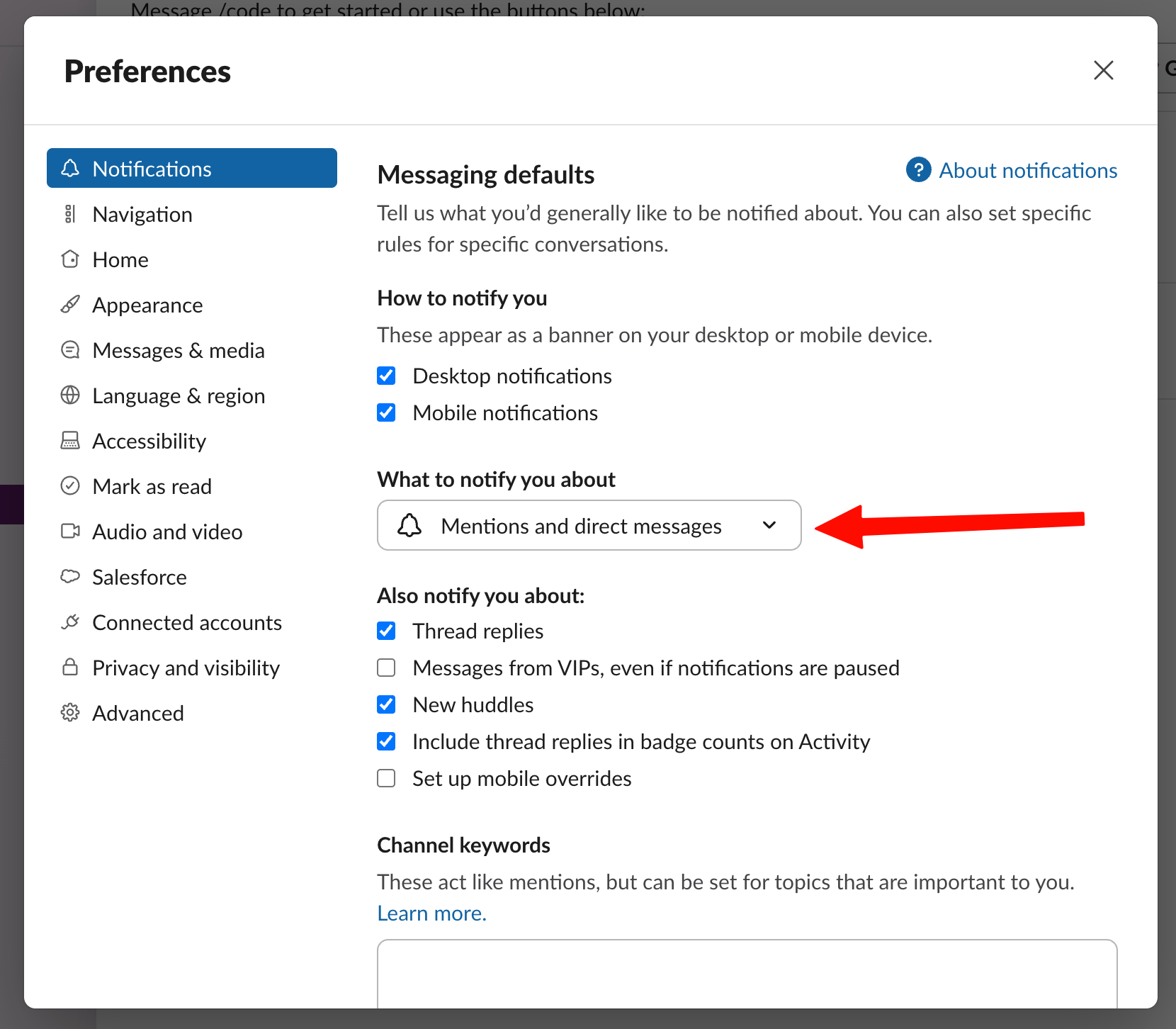
Enable direct messages and mentions from apps in your Slack settings. Codestodian uses app DMs for review requests and other notifications, so users with app DMs disabled can miss important messages about their current work or miss the response to their /code commands.
To do this, access the current workspace settings by clicking on the workspace name in the top left of the Slack app then selecting 'Preferences'. Once you have done so, you will be presented with the following modal:
Invite Codestodian to the channels you want it to use it in
Invite @codestodian to the channels where you want to run commands or receive updates. If the app is not present in the relevant channel, slash commands and channel notifications may not work as expected.
Link each user's Git account
Ask each team member to link their GitHub or GitLab account from the Codestodian app home. This allows Codestodian to map Git activity to the correct Slack user for notifications and collaboration features.
Reconnect Slack if the workspace token becomes invalid
If slash commands stop responding or Slack delivery fails, workspace admins should reconnect Slack from the Codestodian dashboard settings. This restores the workspace connection without requiring a fresh installation.